

I currently have more than 18 courses on the online education platform Platzi where I teach JavaScript, the use of the terminal is very important in my courses when we are working with NodeJS or JavaScript with a Framework or Library.
One of the questions I get asked the most is what my terminal/console/bash/promt configuration is, to which I always answered that it was a custom theme created based on the default themes included in Oh My Zsh.
It is not until now that I prepare the theme, optimize it and adapt it so that everyone can install it in their Oh My Zsh configurations.
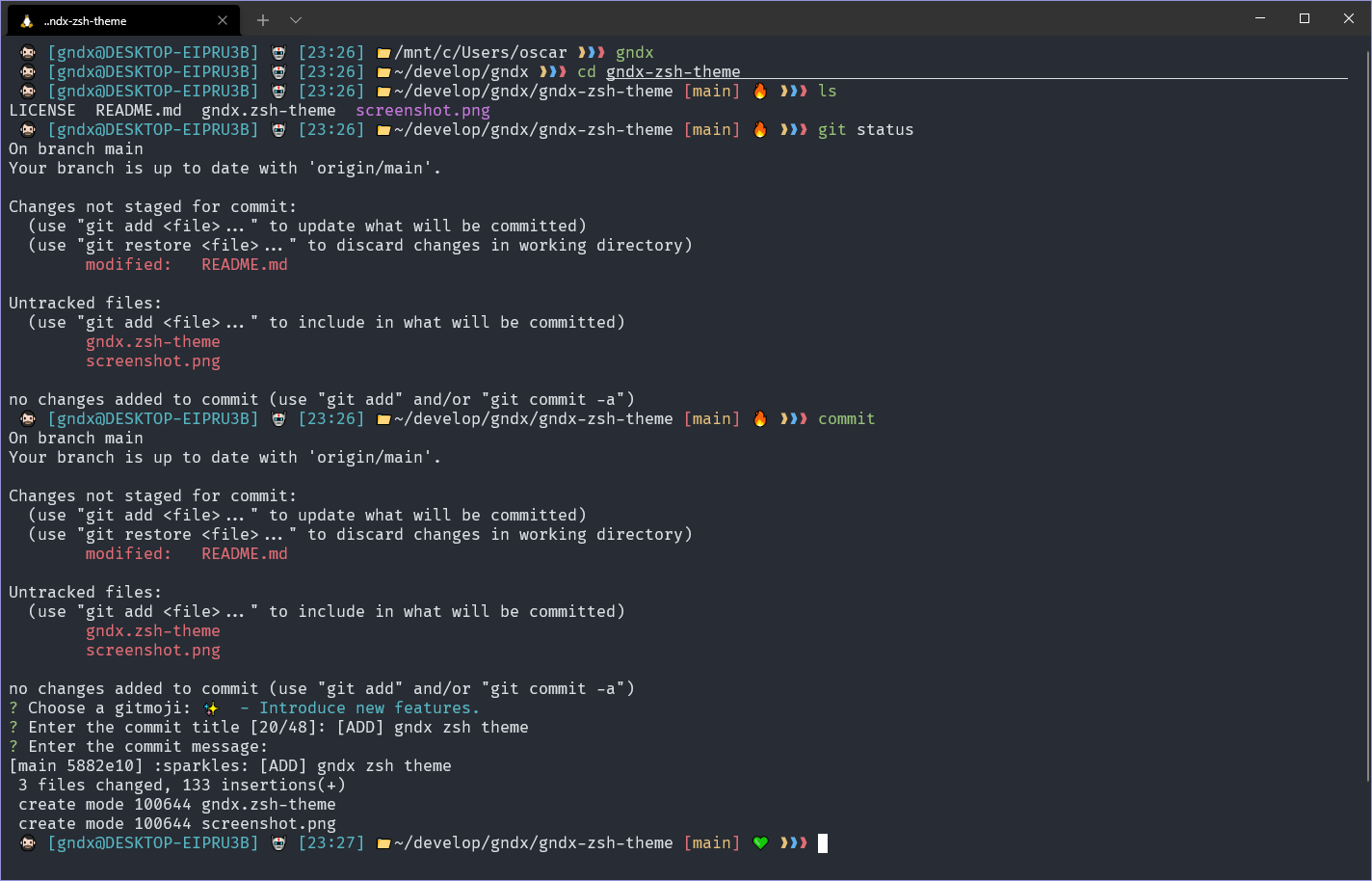
Preview of gndx-zsh-theme
Facility
In your terminal write the following:
git clone https://github.com/gndx/gndx-zsh-theme/ $ZSH_CUSTOM/themes/gndx-zsh-themeOpen your settings:
.zshrcChange the value of
ZSH_THEMEtogndx-zsh-theme/gndx
More information: Oh-My-Zsh External themes
Extras
I currently use the plugins zsh-autosuggestions and zsh-syntax-highlighting which allow me to have a better experience using the commands.
Recommended source: FiraCode
Contribute
If anyone wants to add or improve something, I invite you to collaborate directly in this repository: gndx-zsh-theme
License
gndx-zsh-theme is released under the MIT License.